
One plan, everything included·Team ₹120/user/month·Business on custom pricing
GST invoicing
Trakkar logo

How to create a GST invoice from tracked hours

Turn Friday's approved timesheet into a GST-ready PDF — HSN, GSTIN, and Indian financial year numbering included. Trakkar Team at ₹120/user prefills invoices from project time reports.

HSN · GSTIN · Indian FY · hours-to-invoice

Most agencies still copy hours from a spreadsheet into Zoho or Tally every month. Trakkar closes that gap: billable sessions logged against projects become line items on a GST invoice in one flow — no re-keying, no Friday-night math.

Step by step

How it works in Trakkar

A practical workflow your team can run every billing cycle.

  1. Track billable hours against the projectYour team clocks time on the desktop tracker or submits manual entries for manager approval. Each session ties to a project and task, so Friday's timesheet is already grouped by client.
  2. Review the project time reportOpen the project report for the billing period — weekly, monthly, or a custom range. Filter to billable hours, check member rates, and confirm the total before you invoice.
  3. Prefill the GST invoice from tracked hoursCreate a new GST invoice and pull from the project time report. Line items, quantities, and rates populate automatically from logged sessions.
  4. Add HSN, GSTIN, and tax detailsYour org GSTIN, client's billing GSTIN, HSN/SAC codes from the SKU catalog, and CGST/SGST or IGST split are applied. Invoice numbers follow your Indian financial year sequence.
  5. Export PDF and email the clientChoose a template, preview the GST PDF, and email it in one click. Partial payments and TDS can be recorded when the client pays. The same invoice is visible in the client portal.
The Friday workflow

From timesheet sign-off to GST PDF

A typical agency billing week ends with a manager approving hours on Friday afternoon.

By Monday morning, the finance lead opens Trakkar, selects the client project, and generates a GST invoice prefilled from approved hours. No export to Excel, no duplicate entry in accounting software, and no guessing which sessions were billable.

  • Desktop tracker with optional screenshots and app usage
  • Manual time entries with manager approval workflow
  • GST invoices with HSN, GSTIN, and Indian FY numbering
  • Quotations that convert to invoices in one step
  • Client portal for invoice visibility and payment status
What Team includes

₹120/user — invoicing is not an add-on

Trakkar Team includes time tracking, attendance, Indian leave types, GST invoicing, and the client portal at one INR price.

  • Unlimited projects and team members on Team
  • Indian leave templates, holidays, and approval workflows
  • Four GST invoice templates with one-click PDF export
  • Billing contacts, SKU catalog, and receivables aging
  • Optional screenshot monitoring — configurable per user
Compliance

Built for Indian GST billing

Trakkar ships with GSTIN fields on org and client records, HSN/SAC on the SKU catalog, CGST/SGST/IGST tax types, and invoice numbering aligned to the Indian financial year (April–March). Partial payments and TDS tracking keep receivables accurate without a separate accounting tool for routine client billing.

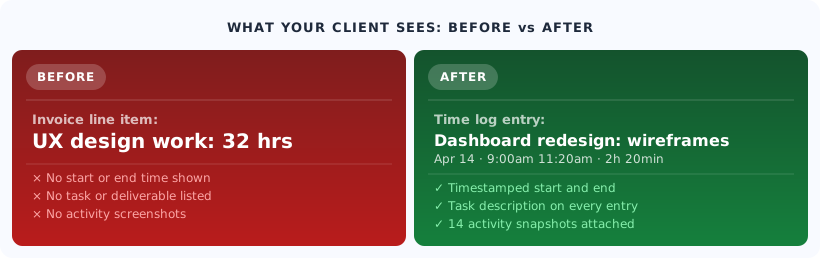
Documented tracked hours versus vague invoice line items
Trust

Trusted by teams across India

More guides

Related problem-solving guides

Practical workflows for Indian agencies billing from tracked hours.

View all guides

Common questions

Yes. Open a project time report for your billing period, then create a GST invoice prefilled from those hours. Line items, rates, and quantities come from logged sessions — you add tax details and send the PDF.

Try Trakkar now.

Start Free TrialBook a demo
No credit card required. Cancel anytime.